
Section Links
Lump Sum Draws
Lump Sum Draws is a method of Draw Submission that streamlines data entry for the Borrower. Rather than filling out a Draw Form with each line item referencing the draw for that line, the Borrower is presented with a single field to enter the total value of the Draw.
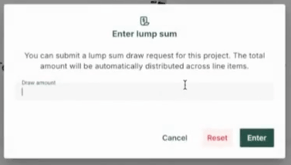
What the Lender receives is the standard Draw Request form, but the value of the Draw is evenly distributed amongst the lines. The Lender is able to then alter those values to accurately reflect the Draw before finalizing. This is an important step to maintain accurate budget history on the Project.
Activating Lump Sum Draws On a Project
Activation of the Lump Sum feature on a Project can only be done by a user with Admin permissions, but is a quick and easy process.
- Go to the Project Page
- Go to the Other tab
- Under Draw settings, flip the toggle to the right
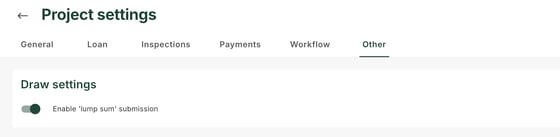
Once finished, when your Borrowers go to submit a Draw, instead of the full Draw Form they will be presented a field to enter the lump sum for the Draw.
Processing a Lump Sum Request
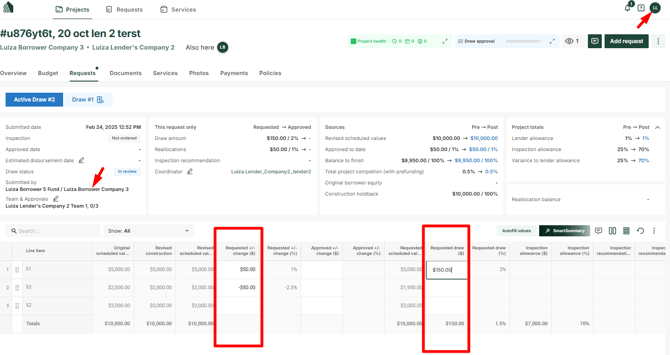
When you receive a Lump Sum Request you'll find that the amount is evenly distributed amongst various line items. Be sure to review the Draw against the current budget, and update the Requested +/- change )$) and Requested draw ($) columns to accurately reflect how much of each line item is being approved for the Draw. When completed, the Borrower is able to review the Approved Draw as well as see the current line item values reflected in the current budget.
- On the Project Page go to the Requests tab
- Review the line items and identify the lines requiring update
- Replace the amounts with the revised figures
Once you have updated the line item values for the Draw, you are now able to proceed with finalizing the Draw.
NOTE: Any changes made to the values submitted by the Borrower in the request by the Lender will be tracked in the audit log.