
An Authorized Borrower User is able to access the project/s with the ability to take the same actions as the Primary Borrower User. These users can be removed by either the Lender, the Borrower, or another Authorized Borrower User on the Project.
The process for removal is quick and easy. Let's walk through it together.
- Go to the Project Overview Page
- In the Project information block click the People Icon at the top right corner
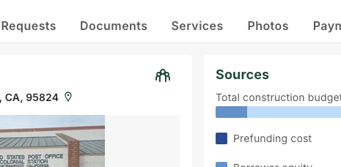
- Locate the User you wish to remove from the list
- Open the Options Menu on the right of the user's line
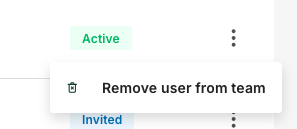
- Click Remove user from team
Removed users will no longer have access to the Project they were removed from. If they log in after removal they will see a message explaining that their access was removed.